- Checkout Optimization Plugins
- Analytics and A/B Testing Plugins
- How to Choose the Right Plugins for Your Store
- Frequently Asked Questions
Running a successful WooCommerce store in 2026 is about more than just having great products. It comes down to conversion rate optimization (CRO) — turning your hard-earned traffic into paying customers. The right WooCommerce plugins can dramatically improve your sales by streamlining the shopping experience, building trust, and nudging visitors toward purchase. In this guide, we’ll explore the top plugins for high conversions, from cart recovery to checkout optimization, so you can build a store that truly sells.
Key Takeaways
- Prioritize abandoned cart recovery plugins to recover nearly 70% of lost sales.
- Optimize product pages with add-ons and variation tables to increase average order value.
- Use upsell and cross-sell plugins to boost revenue from existing customers.
- Install social proof tools like TrustPulse to build trust and reduce hesitation.
- Keep your plugin list lean to avoid slowing your site and hurting conversions.
Why Conversion-Focused Plugins Matter
Many store owners focus on getting traffic, but traffic without conversions is wasted ad spend. According to Baymard Institute, the average cart abandonment rate across eCommerce is nearly 70%. That means seven out of ten visitors leave without buying. Plugins designed specifically for CRO help you capture that lost revenue by addressing common drop-off points: slow pages, confusing checkout flows, lack of trust signals, and missed upsell opportunities. For a deeper dive into CRO strategies, check out our How to Increase WooCommerce Sales: The Ultimate 2026 CRO Checklist.
Abandoned Cart Recovery Plugins
Cart abandonment is the biggest revenue leak for most stores. Fortunately, several powerful plugins can recover these lost sales.
CartBounty
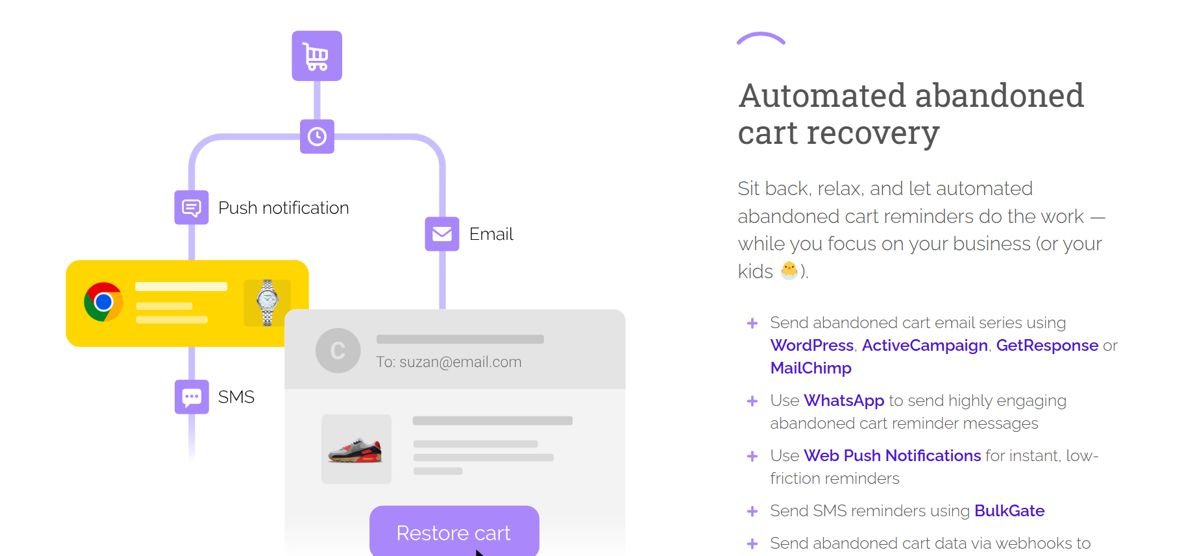
CartBounty is a free premium plugin that tracks abandoned carts and sends automated email reminders. It supports email sequences, SMS notifications, and even exit-intent popups to capture emails before visitors leave. The best part? It integrates seamlessly with WooCommerce without slowing down your site.
YITH WooCommerce Recover Abandoned Cart
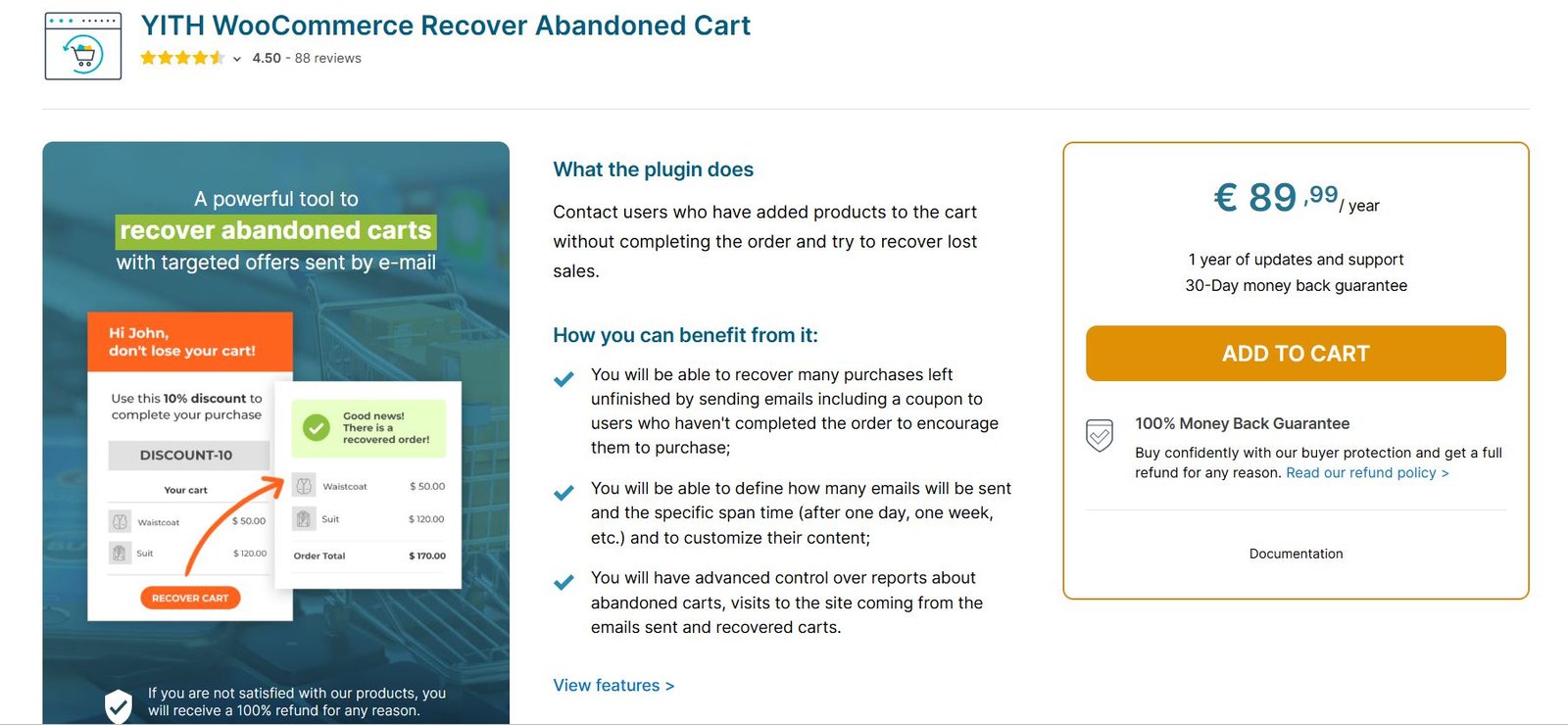
This plugin offers a robust set of features including email scheduling, coupon incentives, and detailed analytics. You can see exactly how many carts you’ve recovered and the revenue generated. For beginners, it offers an intuitive setup wizard that pairs well with our Ultimate WooCommerce Course for Beginners.
External tip: For advanced recovery strategies, see Oberlo’s guide on abandoned cart emails.
Product Page Optimization Plugins
Your product page is where conversions happen or die. These plugins optimize every element from images to CTAs.
Product Add-Ons and Variations
Plugins like Product Add-Ons by WooCommerce let you offer custom fields, checkboxes, and dropdowns on product pages. This allows customers to personalize their purchases, increasing perceived value and checkout totals.
Enhanced WooCommerce Product Tables
For stores selling multiple variations (like sizes or colors), a product table plugin can display all options in a clean, sortable grid. This reduces page load and improves the browsing experience, directly boosting conversion rates. For more on optimizing product pages, refer to our CRO Checklist.
Upsell and Cross-Sell Plugins
Increasing average order value (AOV) is one of the fastest ways to grow revenue. These plugins make it easy to recommend related products.
One plugin that works especially well for boosting conversions is Related Products PRO for WooCommerce. Unlike the default WooCommerce related products system, this plugin gives you full manual control over which products appear as recommendations, including variation-specific related products, AJAX add-to-cart, drag & drop sorting, SEO-friendly linking, and smart cross-selling features. It’s designed to help store owners increase average order value and create more relevant shopping experiences that actually convert visitors into customers.
WooCommerce Conditional Shipping and Payments
With this plugin, you can set rules for when to offer free shipping or payment gateways based on cart total, which encourages larger orders. You can trigger upsells like “Add this accessory for 20% off” right at checkout.
SellKit
SellKit is an all-in-one plugin that bundles order bumps, checkout customization, and one-click upsells. Its funnel builder helps you create post-purchase offers that seamlessly integrate with WooCommerce. Beginners can learn more about setting this up with our Shopify vs WooCommerce: Which Is Easier for Beginners? guide.
Social Proof and Urgency Plugins
Psychological triggers like scarcity and trust signals can significantly lift conversions.
TrustPulse
TrustPulse shows real-time notifications of recent purchases or sign-ups on your site. Seeing “John from New York just bought this product” creates social proof and builds trust instantly. It’s lightweight and compatible with most WooCommerce themes.
EverSales
EverSales offers similar social proof popups but also includes countdown timers for limited-time offers. The urgency of a ticking clock can push hesitant buyers to complete their purchase. These tools work especially well with the CRO strategies in our checklist.
Checkout Optimization Plugins
If your checkout is clunky or slow, you lose customers. These plugins streamline the process.
Checkout Field Editor
This WooCommerce plugin lets you rearrange, add, or remove checkout fields. You can simplify forms by removing unnecessary fields, which reduces friction and speeds up the purchase. A shorter checkout means higher conversion rates.
Direct Checkout for WooCommerce
Direct checkout plugins allow customers to skip the cart page entirely and go straight to checkout. This can be a game-changer for impulse buys or single-product stores. For a broader platform comparison, see our WooCommerce vs Shopify vs Wix article.
Analytics and A/B Testing Plugins
You can’t improve what you don’t measure. These plugins provide the data you need to optimize.
Google Analytics for WooCommerce
The official Google Analytics plugin integrates eCommerce tracking, letting you see which products are selling, where visitors drop off, and which marketing channels perform best. It’s essential for data-driven decisions.
Metrilo
Metrilo combines analytics with CRM and email marketing. It offers cohort analysis, retention tracking, and personalized campaigns. For serious growth, this plugin helps you understand customer lifecycles. Pair it with our best WordPress courses to deepen your marketing skills.
External resource: Learn more about A/B testing methods from ConversionXL’s A/B testing guide.
How to Choose the Right Plugins for Your Store
With hundreds of WooCommerce plugins available, it’s easy to overload your site with extras that slow performance. Start with these criteria:
- Speed: Choose lightweight plugins that don’t bloat your site. Test them on staging first.
- Compatibility: Make sure the plugin is updated for the latest WooCommerce version and your theme.
- Support and reviews: Check ratings and support response times. Avoid plugins with no recent updates.
- Focus on ROI: Prioritize plugins that directly address your biggest conversion leaks — like cart abandonment or poor checkout flow.
If you’re just starting, consider our WooCommerce course for step-by-step guidance on building a high-converting store. And for a comprehensive view of the WordPress ecosystem, read Is WordPress Still Worth It in 2026?.
Frequently Asked Questions
Do I really need conversion plugins for WooCommerce?
While WooCommerce is powerful out of the box, conversion plugins fill specific gaps like cart recovery and upselling that are proven to increase revenue. Most successful stores use at least a few of these tools.
Will these plugins slow down my site?
Some plugins can affect speed if poorly coded. Always choose well-reviewed, lightweight plugins, and run performance tests after installation. Using a caching plugin can offset any minimal impact.
How many conversion plugins should I install?
Start with one or two that target your biggest need (e.g., cart recovery). You can add more as you grow. Overloading your site with plugins often leads to conflicts and slow load times.
Can I use these plugins with any WooCommerce theme?
Most plugins are designed to work with any WC3-compatible theme, but check the plugin documentation for specific requirements. Theme compatibility is especially important for checkout and product page plugins.
Are free conversion plugins as effective as paid ones?
Free plugins can be effective for basic needs like simple cart recovery or field editing. However, premium plugins usually offer more features, better support, and regular updates. For serious stores, a mix of both works well. For a full CRO strategy, see our 2026 CRO Checklist.