Key Takeaways
Short on time? Here are the essential strategies for boosting your WooCommerce conversions:
- Optimize Product Pages: Use high-resolution images, write benefit-driven descriptions, and display customer reviews to build trust and desire.
- Streamline Checkout: Minimize form fields, offer guest checkout, and provide multiple payment options to reduce friction and cart abandonment.
- Prioritize Site Speed: A fast-loading store improves user experience and SEO, directly impacting your conversion rate. Aim for a load time under 3 seconds.
- Leverage Email Marketing: Implement automated cart abandonment emails and post-purchase follow-ups to recover lost sales and build customer loyalty.
- Test Everything: Use A/B testing to make data-driven decisions on everything from button colors to headlines, ensuring continuous improvement.
Building a WooCommerce store is an exciting first step, but launching is only half the battle. If you’ve invested time and money into your site only to see lackluster results, you’re not alone. The key to unlocking your store’s true potential lies in a disciplined approach to conversion rate optimization (CRO). This guide provides a comprehensive checklist on how to increase WooCommerce sales by turning more of your visitors into paying customers. It’s not just about getting more traffic; it’s about making your existing traffic more valuable.
Table of Contents
- What is Conversion Rate Optimization (CRO) for WooCommerce?
- Step 1: Radically Optimize Your WooCommerce Product Pages
- Step 2: Streamline the Checkout Process to Reduce Abandonment
- Step 3: Boost Site Speed and Performance
- Step 4: Implement a Powerful Content and SEO Strategy
- Step 5: Leverage Email Marketing and Cart Abandonment Campaigns
- Step 6: Use A/B Testing to Make Data-Driven Decisions
What is Conversion Rate Optimization (CRO) for WooCommerce?
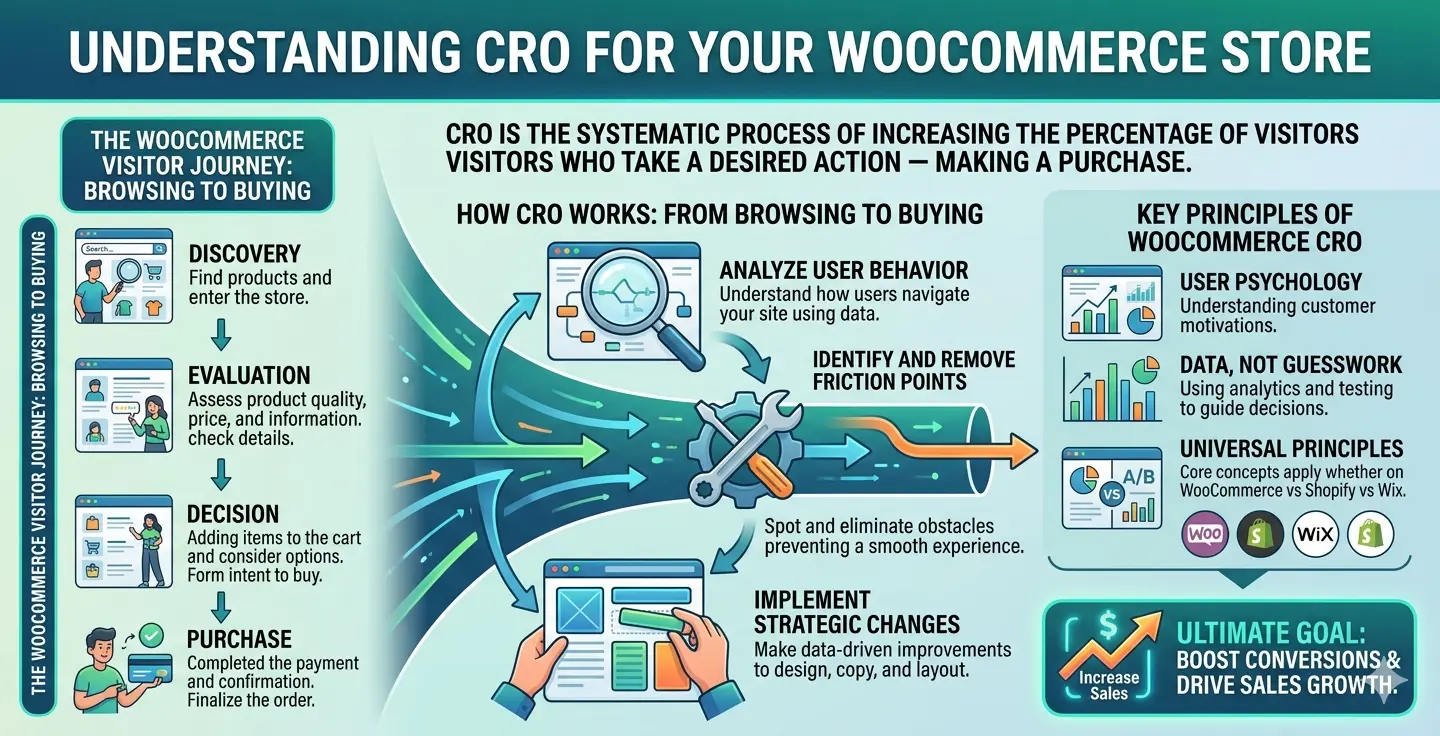
Conversion Rate Optimization (CRO) is the systematic process of increasing the percentage of website visitors who take a desired action — in this case, making a purchase. For a WooCommerce store, this means analyzing how users navigate your site, identifying potential friction points, and making strategic changes to improve their journey from browsing to buying. While platforms like WooCommerce vs Shopify vs Wix all offer different tools, the principles of CRO remain universal. It’s about understanding user psychology and using data, not guesswork, to refine the user experience.
Step 1: Radically Optimize Your WooCommerce Product Pages
Your product page is your digital storefront. It’s where the most critical purchase decisions are made. A poorly optimized page will leak conversions, no matter how great your product is.

High-Quality Imagery and Video
Humans are visual creatures. Shoppers can’t touch or feel your products online, so your visuals have to do all the work. Use high-resolution photos from multiple angles, include a zoom function, and showcase the product in use. Product videos are even better, as they can demonstrate features and benefits in a way static images can’t.
Compelling Product Descriptions
Go beyond listing technical specs. Write product descriptions that tell a story and sell the benefits. How will this product make your customer’s life better? Use bullet points for scannability, focus on emotional triggers, and maintain a consistent brand voice. A strong description builds desire and answers questions before they are asked.
Social Proof: Reviews and Testimonials
According to research, over 90% of consumers read online reviews before making a purchase. Social proof is one of the most powerful tools in your CRO arsenal. Encourage customers to leave reviews (perhaps with a small discount on a future purchase) and prominently display them on your product pages. This builds immense trust and credibility.
Step 2: Streamline the Checkout Process to Reduce Abandonment
The average cart abandonment rate hovers around 70%. A significant portion of this is due to a long or complicated checkout process. Every extra field, every unnecessary click, is a chance for your customer to leave. Your goal is to make paying as frictionless as possible.
Simplify and Reduce Form Fields
Do you really need their phone number, date of birth, and company name? Probably not. The Baymard Institute consistently finds that a complex checkout process is a top reason for abandonment. Eliminate every non-essential field. Use features like address auto-completion to make it even faster.
Offer Guest Checkout
Forcing users to create an account before they can buy is a major conversion killer. Always provide a clear, easy-to-see guest checkout option. You can always prompt them to create an account *after* the purchase is complete by simply adding a password.
Provide Multiple Payment Gateways
Don’t limit your customers’ options. Integrate trusted payment gateways like Stripe (for credit cards), PayPal, and digital wallets like Apple Pay and Google Pay. Seeing a familiar and trusted payment logo can significantly increase a user’s confidence in completing the purchase.
Step 3: Boost Site Speed and Performance
In eCommerce, speed equals revenue. A slow-loading website frustrates users and hurts your search engine rankings. A 1-second delay in page load time can result in a 7% reduction in conversions. The foundation of a fast store is solid hosting and a lightweight theme, but optimization is an ongoing task. Use tools like Google PageSpeed Insights to analyze your site and get actionable recommendations. Compressing images, leveraging browser caching, and using a Content Delivery Network (CDN) are essential steps.
Step 4: Implement a Powerful Content and SEO Strategy to Increase WooCommerce Sales
Driving high-quality, targeted traffic is fundamental to sales. Search Engine Optimization (SEO) ensures that customers searching for products like yours can find you. This goes beyond basic product page optimization. Start a blog that answers common customer questions and addresses their pain points. For instance, if you sell hiking gear, write articles about the best local trails. This builds authority and attracts qualified buyers. If you’re new to the ecosystem, you might want to Learn WordPress fundamentals first, as it’s the powerful CMS that WooCommerce is built on.
Step 5: Leverage Email Marketing and Cart Abandonment Campaigns
Email marketing delivers one of the highest ROIs in digital marketing. It’s your direct line to your customers, allowing you to build relationships and drive repeat purchases.
Cart Abandonment Emails
This is low-hanging fruit. Set up an automated email sequence that triggers when a user adds an item to their cart but doesn’t complete the purchase. The first email, sent about an hour later, can be a simple reminder. A follow-up email 24 hours later could offer a small discount or highlight customer reviews to create urgency and trust. There are many excellent plugins that integrate directly with WooCommerce for this.
Post-Purchase Follow-ups
The conversation doesn’t end at checkout. Use post-purchase emails to thank the customer, provide shipping updates, ask for a review, and suggest related products. This strengthens the customer relationship and increases lifetime value. Even though some platforms may be considered easier for beginners, WooCommerce’s power lies in this deep customization.
Step 6: Use A/B Testing to Make Data-Driven Decisions
How do you know if a green “Buy Now” button converts better than an orange one? You test it. A/B testing (or split testing) involves creating two versions of a page (Version A and Version B) and showing them to different segments of your audience. You then analyze which version performed better towards a specific goal, like clicks or purchases. You can test headlines, images, calls-to-action (CTAs), page layouts, and more. This process eliminates guesswork and ensures every change you make is a measurable improvement.
Frequently Asked Questions (FAQ)
What is a good conversion rate for a WooCommerce store?
A good conversion rate can vary widely by industry, but a general benchmark for eCommerce is between 1% and 3%. Highly optimized stores in niche markets can achieve higher rates. The most important thing is to focus on continuously improving your own baseline rate rather than fixating on averages.
How can I reduce cart abandonment in WooCommerce?
The best ways to reduce cart abandonment are to simplify the checkout process by removing unnecessary fields, offer guest checkout, be transparent about all costs (especially shipping) upfront, display trust signals like security badges, and use cart abandonment emails to bring shoppers back.
What are the most important metrics to track for WooCommerce CRO?
Beyond the overall conversion rate, you should track Cart Abandonment Rate, Average Order Value (AOV), Customer Lifetime Value (CLV), bounce rate on product pages, and checkout funnel drop-off points. Analyzing these metrics will reveal where the biggest opportunities for improvement lie.
Is paid traffic necessary to increase WooCommerce sales?
Paid traffic (like Google Ads or social media ads) can accelerate growth and provide valuable data quickly, but it’s not strictly necessary. A strong organic strategy built on SEO and content marketing can be highly effective and more sustainable long-term. Many successful stores use a hybrid approach. The underlying question of is WordPress still worth it is often answered by its powerful SEO capabilities, which directly support organic growth.