If you run an online store and want your products to appear across Google Search, Images, YouTube, and Shopping tabs, you’ve probably wondered what Google Merchant Center is used for. In simple terms, Google Merchant Center is the free hub where you upload your product data so Google can display it to millions of shoppers actively searching for what you sell. For WooCommerce store owners, mastering this platform is one of the fastest ways to scale visibility, traffic, and conversions in 2026.
In this guide, we’ll break down exactly what Google Merchant Center does, who needs it, how it connects to your store, and the practical ways you can use it to grow your eCommerce business.
Key Takeaways
- Google Merchant Center is the free hub for uploading product data to Google.
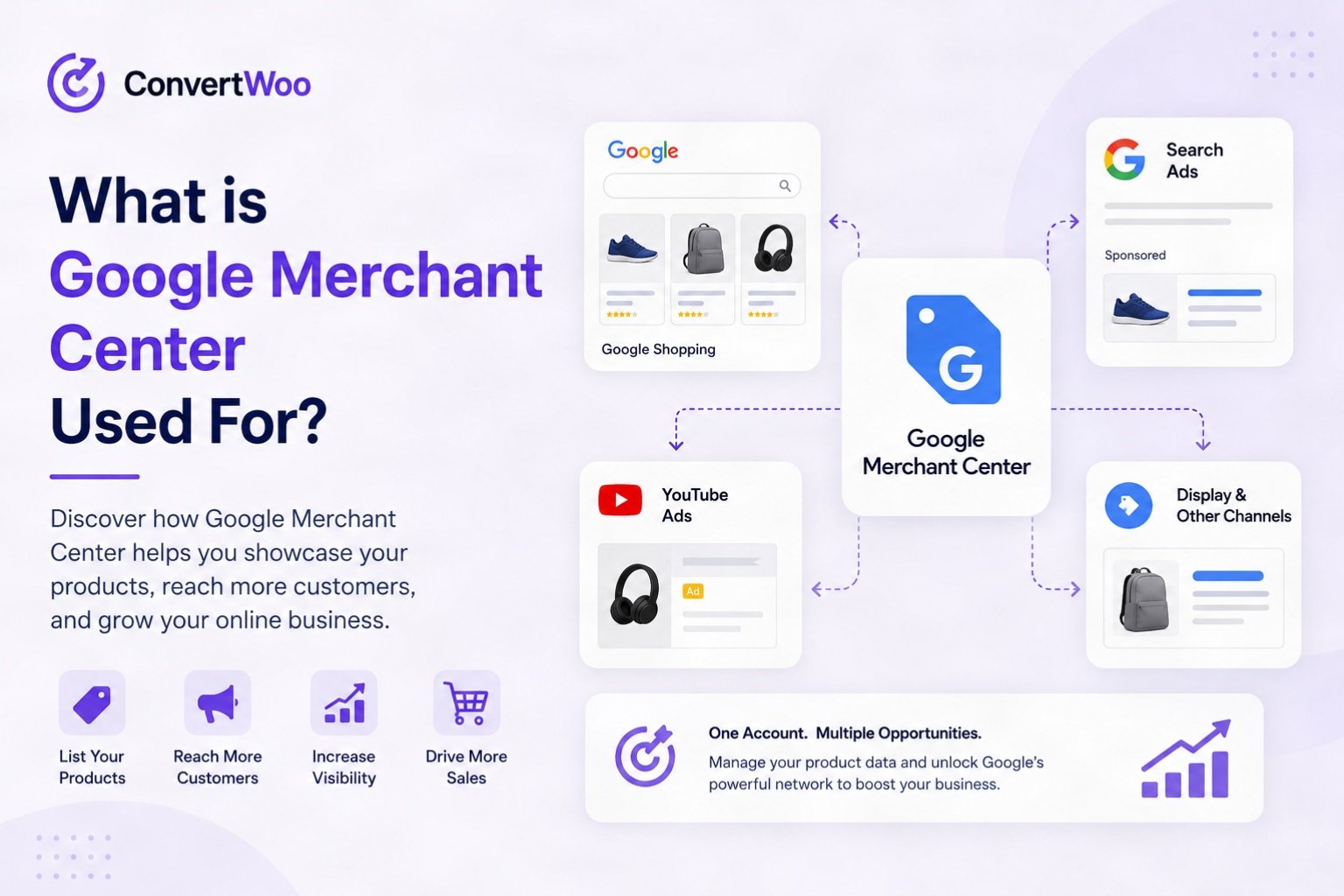
- It powers Shopping Ads, free product listings, YouTube, Gmail, and Discover placements.
- WooCommerce stores can sync inventory instantly using the Google Listings & Ads plugin.
- Accurate pricing, high-quality images, and compliant data are essential for approval.
- Pair Merchant Center with strong CRO tactics to maximize ad spend returns.
Table of Contents
- What Is Google Merchant Center?
- The Main Uses of Google Merchant Center
- How Google Merchant Center Works
- Key Benefits for WooCommerce Store Owners
- How to Set Up Google Merchant Center
- Common Mistakes to Avoid
- Frequently Asked Questions

What Is Google Merchant Center?
Google Merchant Center is a free tool from Google that allows retailers to upload product information — titles, descriptions, prices, images, availability, and more — so it can be shown across Google’s ecosystem. Think of it as the bridge between your online store and Google’s shopping surfaces.
Without Merchant Center, you cannot run Google Shopping Ads, list free product listings, or display rich product results in search. It’s the foundation of every successful Google-powered eCommerce strategy.
The Main Uses of Google Merchant Center
Google Merchant Center is used for several critical eCommerce functions. Here are the most important ones:
1. Powering Google Shopping Ads
The most popular use case. Merchant Center feeds product data into Google Ads, which then displays your products as visual Shopping Ads at the top of search results. These ads convert better than text ads because shoppers see your image, price, and brand before they click.
2. Free Product Listings on Google
Since 2020, Google offers free organic listings in the Shopping tab. By syncing your WooCommerce catalog with Merchant Center, your products can appear in front of buyers at zero cost — a huge win for small stores with tight budgets.
3. Local Inventory Ads
If you have a physical location, Merchant Center can promote in-store inventory to nearby shoppers, blending online discovery with offline purchases.
4. Showcasing Products on YouTube and Gmail
With Performance Max campaigns, your Merchant Center feed can also display products on YouTube, Gmail, Discover, and the Display Network — expanding reach far beyond traditional search.
5. Product Data Compliance and Quality Monitoring
Merchant Center continuously checks your product data for accuracy, policy compliance, and quality issues. This is closely tied to Google’s content policies — including the famous text-on-image rule. Learn more in our guide on what the 20% rule in Google means for your product images.
How Google Merchant Center Works
Merchant Center operates on a simple but powerful concept: the product feed. Here’s the workflow:
- You create a feed — a structured file (or live API connection) containing all your product attributes.
- Google validates the data — checking for required fields, image quality, pricing accuracy, and policy compliance.
- Approved products go live — eligible to appear in Shopping Ads, free listings, and other surfaces.
- Google tracks performance — providing diagnostics, click data, and impression metrics.
For WooCommerce users, plugins like Google Listings & Ads or third-party feed managers automate this process, syncing your store inventory in near real time.
Key Benefits for WooCommerce Store Owners
If you’ve built your store on WordPress, Google Merchant Center unlocks several growth advantages:

- Higher-intent traffic: Shoppers searching on Google Shopping are ready to buy.
- Visual product discovery: Images and prices appear before the click — pre-qualifying visitors.
- Free exposure: Organic listings cost nothing but drive measurable traffic.
- Cross-platform reach: One feed powers ads across Search, YouTube, Gmail, and Discover.
- Data-driven optimization: Built-in diagnostics help you fix issues quickly.
Once you’re driving Shopping traffic, the next step is converting those visitors. Pair Merchant Center with our WooCommerce CRO checklist to maximize your return on ad spend.
How to Set Up Google Merchant Center
Setting up an account is straightforward, but accuracy matters. Follow these steps:
Step 1: Create Your Account
Go to merchants.google.com, sign in with your Google account, and enter your business details.
Step 2: Verify and Claim Your Website
Google needs to confirm you own the domain. You can verify via Google Search Console, an HTML tag, or a file upload. If you’re not yet using Search Console, check out Google’s official guide.
Step 3: Connect Your WooCommerce Store
Install the Google Listings & Ads plugin for WooCommerce. It automatically syncs your products and creates a live feed.
Step 4: Configure Shipping and Tax Settings
Inaccurate shipping data is the #1 reason for disapprovals. Set up shipping zones and tax rules carefully.
Step 5: Submit Your Feed and Review Diagnostics
Once submitted, monitor the Diagnostics tab and resolve any warnings or errors quickly.
New to running an online store? Start with our Ultimate WooCommerce Course for Beginners before tackling Merchant Center.
Common Mistakes to Avoid
Even experienced store owners trip up on Merchant Center compliance. Avoid these pitfalls:
- Mismatched prices: The price in your feed must match the price on your product page exactly.
- Low-quality images: Use high-resolution photos with clean backgrounds and no promotional overlays.
- Missing GTINs or MPNs: These identifiers are required for branded products.
- Vague titles: Include brand, product type, key attributes (color, size, material).
- Policy violations: Restricted products like supplements or weapons require special approval.
Wondering if WordPress is still the right foundation for your store? Read our 2026 industry analysis on WordPress to decide.
Frequently Asked Questions
Is Google Merchant Center free to use?
Yes, Google Merchant Center is completely free. You only pay if you choose to run paid Shopping Ads through Google Ads. Free organic product listings cost nothing.
Do I need Google Merchant Center for my WooCommerce store?
If you want your products to appear on Google Shopping, Images, or YouTube — yes. It’s essentially required for any serious eCommerce visibility strategy on Google.
How long does it take to get approved?
Most accounts are reviewed within 3–5 business days. Product data approvals can take 24–72 hours after submission, assuming no policy violations.
Can I use Merchant Center without running ads?
Absolutely. Free product listings allow your inventory to show up organically in Google Shopping results without any ad spend.
What’s the difference between Merchant Center and Google Ads?
Merchant Center stores and manages your product data. Google Ads is where you create and manage paid campaigns that use that data. They work together but serve different functions.